June 2026 Cycle Report
Published 22 June 2026
📖 Available Budget of Challenges
With this year's challenge season getting into gear, we're focussing on a much-requested feature: up-to-date challenge budget statistics.
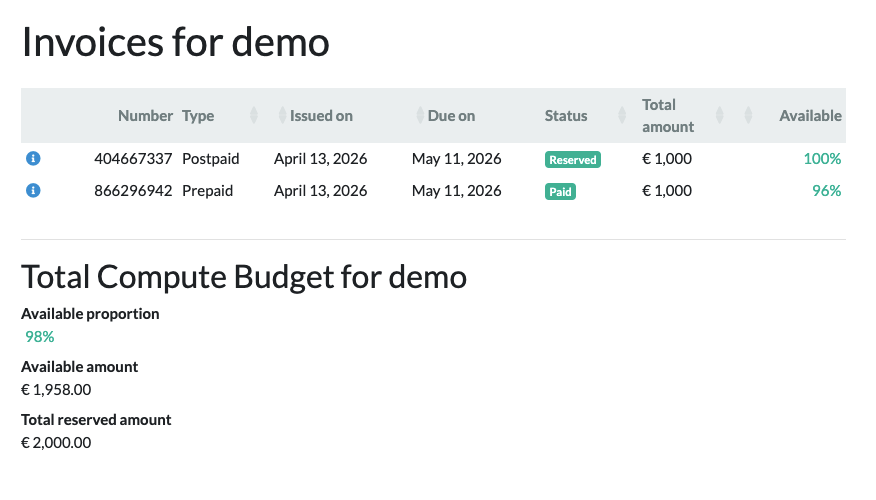
Challenge organisers already received warnings when their budgets ran low. This cycle, we've reworked how we track incurred costs. As a consequence we can now show organisers those costs in (near) real time.
The related challenge-admin page has been renamed 'Invoice & Budget'. Together with the contained invoice detail pages, it gives organisers insight on current budget consumption.
🤖 Algorithm Endpoints
In continuation of our work on algorithm endpoints (which allow an algorithm to be invoked multiple times) we have implemented the invocation model to enable and manage these invocations and added the REST API endpoint for requesting and querying invocations.
While implementing and testing the new invocation model we found out that our new lambda tasks infrastructure is so fast that it led to problems with retrieving the logs! We have now adjusted our handling of both algorithm jobs and invocations to no longer rely on the logs for reporting failures.
🦾 GPU-based interactive algorithms in reader studies
Originally, interactive algorithms in reader studies ran through an AWS Lambda-based path. In our continuation of our work on algorithm endpoints we've opted to use the new invocations endpoints instead for CIRRUS.
The use of this endpoint allows algorithms to use GPU processing, a big boon as this wasn't possible under AWS Lambda. It also has several performance benefits: startup-costs are only paid once and subsequent invokes are very speedy.
When you run an interactive algorithm on a reader study question, CIRRUS now uploads the input to the running endpoint, invokes it, and shows the result as an overlay. The algorithm list overview shows each algorithm to be ready, still starting up, or unavailable. That way you know when it is ready to use.
If a run fails, CIRRUS will show the status together with an error message and a link to the job. Because the endpoint manages its own lifecycle, cancelling a running job is no longer possible. Hence that option has been removed.
For now this feature requires the Grand Challenge support team to manually connect an algorithm to a reader study question. We're eager to explore the options! Please drop us an email at support if you are interested in this feature so we can work together to enable it for you.
⚡ Serverless Asynchronous Tasks
We have migrated the Grand Challenge platform to use AWS Lambda and ECS Tasks on AWS Batch for asynchronous tasks such as image validation, container imports and job scheduling.
Previously we used Celery for this, but found that it was unreliable for long-running tasks. Using AWS Lambda and ECS Tasks means our asynchronous tasks are now serverless, which results in reduced latency, improved scaling, simpler operations, increased reliability, native AWS integration and reduced platform costs.
📚 Budget for Reader Studies
We have implemented some improvements in the way we handle budgets for Reader studies.
Firstly, reviewing a study no longer requires budget availability. Up until now, when a reader study ran out of budget, neither editor nor reader could launch the reader study. This blocked editors from reviewing answers. We have now changed this to allow editors of reader studies to review their readers' answers in read-only mode regardless of study budget. An editor can now always launch the reader study via the "User Progress" page. To prevent abuse — editing or creating new answers, or invoking interactive algorithms are not possible in this mode.
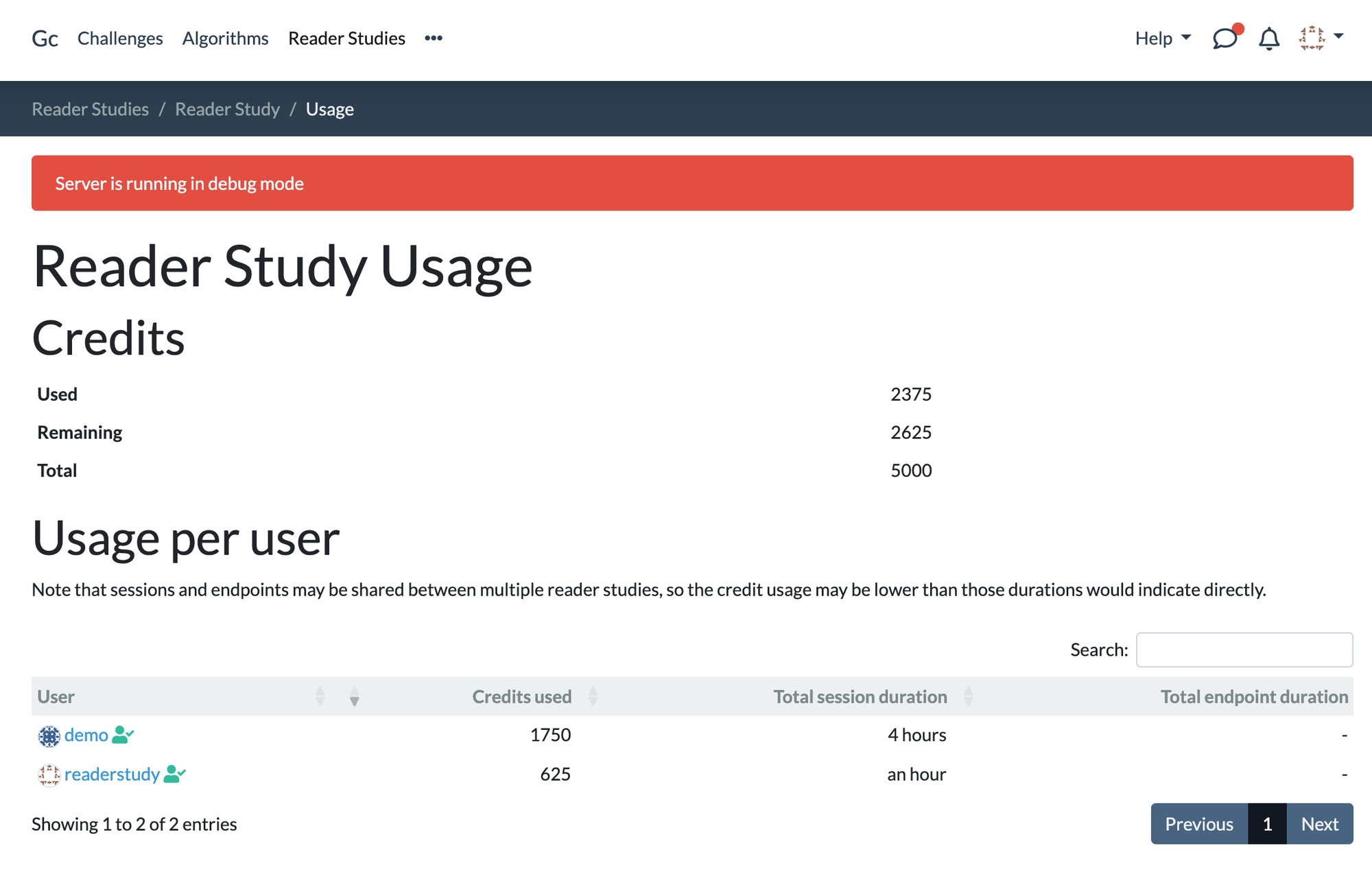
Secondly, we have added a budget overview for editors. They can now see how much budget is left, how much is used and how budget consumption is used by the readers of a study:
🔎 View-Plane Metadata on Annotations in Reader Studies
When creating annotations, a reader generally views a 3D image in a specific orientation.
Previously, the orientation was never stored with the annotation, meaning that a reviewer would need to guess which orientation the annotation was made in. For non-cardinal orientations, this becomes a complex problem. These orientations occur, for instance, in ultrasound reading.
The CIRRUS viewer now stores view plane metadata alongside most annotation types. The data will be recorded whenever an annotation is added or changed in the view_plane property. The view plane describes the orientation and zoom level in the 3D volume that was used to annotate the image, but excludes other viewing details such as window level or slab size.
Clicking on an annotation with stored view-plane metadata will center that annotation as usual, but also attempt to restore the orientation and zoom level within a 2D or 3D volume that was used to create or edit that annotation. When the swivel mode is enabled, this will be a free rotation. If not, a best-effort match based on the main viewing direction will be made.
The new view_plane field can also be set from algorithms on single annotations to guide viewing it in the intended orientation.

Cover photo by Sean Oulashin on Unsplash