May 2026 Cycle Report
Published 21 May 2026
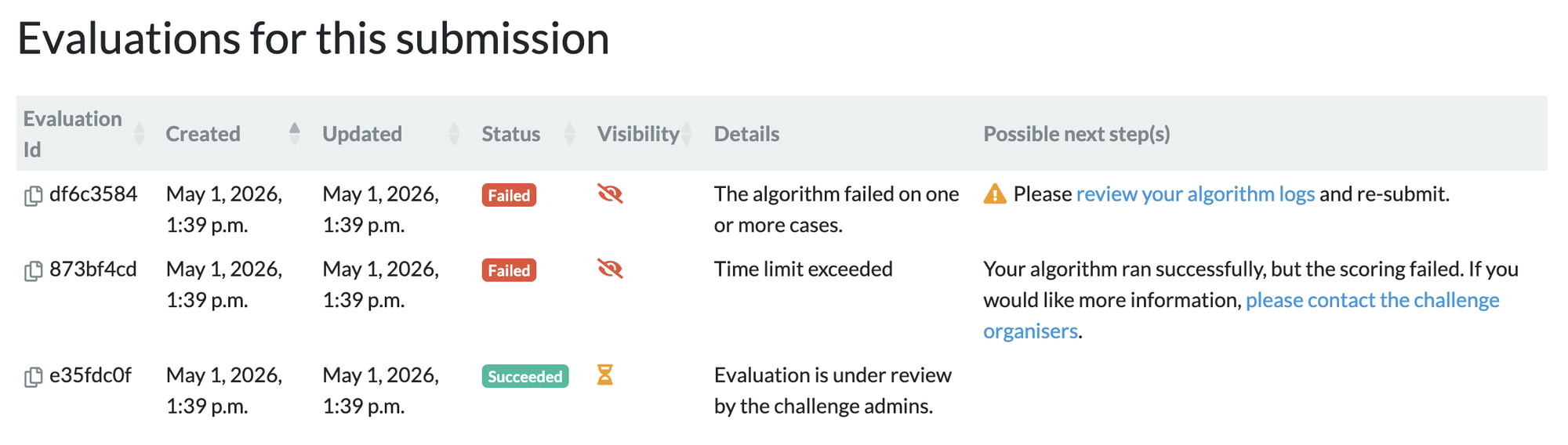
✨ Renewed Evaluations and Submissions overview
With this year’s challenge season just around the corner, we have focused on improving the submission debugging experience for challenge admins and participants. Debugging submission failures is a common pain point — users often struggled to understand what went wrong and what steps to take next. To address this, we’ve introduced actionable messages that explain the error message and suggest concrete next steps. We’ve also restructured the submission list and detail pages to make this information easier to find. The submission list now includes direct links to each submission’s detail page, where you'll find detailed information about linked evaluations — including their visibility status, any error messages, and recommended next steps.
🤖 Invocation of Algorithm endpoints
The work on Interactive Algorithms continued this cycle: the team worked on the backend changes to enable invocations of the Algorithm Endpoints implemented in the April cycle. This allows both our own viewer CIRRUS, as well as external applications, to invoke an Algorithm Endpoint, providing it with the required inputs and retrieving the algorithm outputs, via new methods in our REST API. In the upcoming June cycle this feature will be finalised in conjunction with the implementation of these methods in CIRRUS.
📏 Plane matching for all annotation types in CIRRUS
Navigating to an annotation in the 3D viewer now works consistently across all annotation types. Previously, clicking on certain annotations like distance measurements or angles would not reorient the view, requiring manual adjustment to see the annotation properly. With this update, the viewer automatically finds the best viewing plane for any annotation. For shapes like bounding boxes, ellipses, and polygons, the view aligns to the plane that shows the full annotation. For distance measurements and lines, it selects the orientation where the measurement is most visible. For single-point markers, the view centers on the point without changing your current orientation, so you don't lose context. When the swivel tool is enabled, the viewer can also orient to the exact plane of the annotation rather than snapping to the nearest standard axis, giving you a more precise view of oblique annotations.
🪲 Plenty of Bug fixes in CIRRUS
This cycle the team had some time to hammer out some nasty bugs, the most notable:
- In some contexts, CIRRUS didn't offer the scroll feature for DICOM images.
- When a display set, archive item or algorithm result contained data of kind
Chart, the JSON data would be displayed in the plugin panel. - Using the
auto jump to center of gravitysetting caused errors. - The viewport labels displaying voxel, slice and time index information for 4D images were hidden behind the time controls.

Cover photo by Svetlana Butovskaya on Unsplash
